|
Child Level:
| |
Collaborating in InRoads
- Make sure that potential collaborators aren't doing the same thing
you're doing (don't duplicate or clobber each other's work).
- Copy the "master files" you are modifying to your project temp folder
- Make your changes or additions, using
good object naming techniques
and good file naming techniques.
- Copy your new objects back into the "master files."
- Copy or move any good new shareable project files back to the
project folder or an appropriate well-named or documented subfolder.
- Manage your working or intermediate files so that they don't cause
confusion. Keep them out of the main folders. Delete your copies of
masters, appropriate prefix archive or "just in case" files.
Click for conventions in InRoads Project Data
Management.
Details:
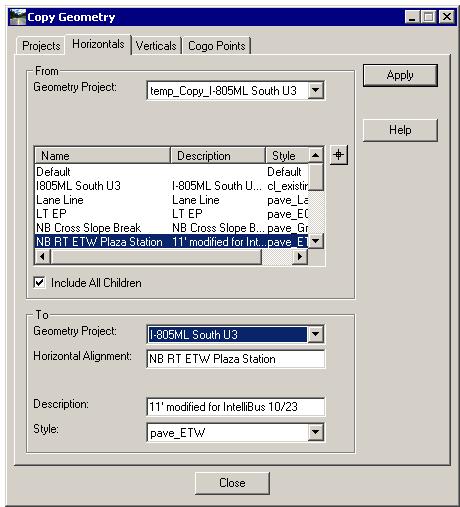
How to Copy New/Modified Alignments back into master Algs:
| The Copy Geometry command (InRoads>Geometry>Copy
Geometry) is used to copy geometry. Note: for updating alignments
already in the To/Target you'll have to first delete that object from
the target. If you try to overwrite an alignment, for example, the
command will fail, (you'll get a "Duplicate alignment name" in the
MicroStation subtle message field).

|
 |
|






