Function Keys
Thank Mario for this change: Multiple Functions key menus!
I've taken the "KHA standard" Function Key Menus and made a customizeable
copy. Both are in your user configuration "funKeys" folder. By
default MicroStation opens into your customizeable menu. Fool with it all
you want. "F6" takes you over to the read-only KHA standard. "F6"
takes you back to your custom. (
You can do whatever you want to your custom Function key menu. If you
create a second function key menu (showoff!), keep it in your "funKeys" folder.
NOTE: Some macros are not ported to v8 yet so some of your function keys may
not work.
Where are the Standard Hot Keys?
By default now, MSv8 opens your customizeable Function Key menu. To get
to the KHASD Standard, click F4. F4 gets you back to your customizeable
menu. The KHASD is read-only.
Editing
Function Keys can be edited via the MicroStation>Workspace>Function Key menu
item.
Editing a key is done by selecting a key from the list, hitting the Edit
button and keying in the microstation command in the New: text box.
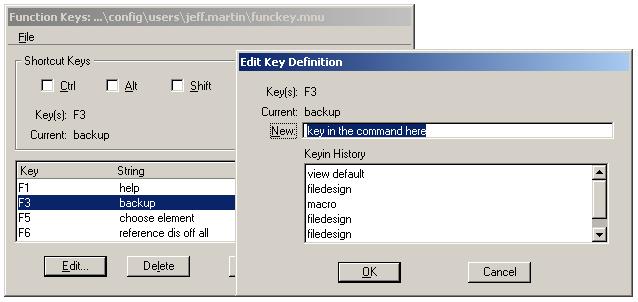
Command Syntax can be found/verified via the MicroStation key-in browser.
|