Ustn Tips and Tricks
Hot Links

Cell Drag-and-Drop
Function Keys
Reference Files Bulk Attach
You can open the MicroStation Reference File manager and drag a whole bunch
of .dgn files into it from a Windows Explorer and MicroStation will load them
all up (make sure you select Coincident World as the attachment type).
KHA-Custom Menu
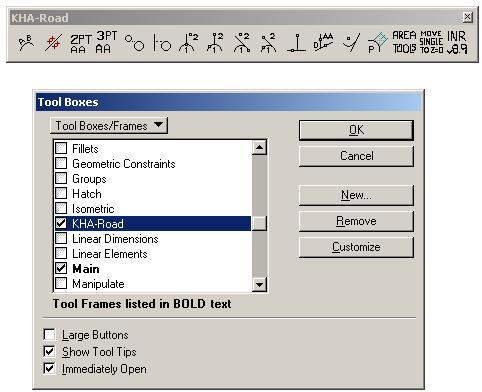
I ported some of the KHA Custom Toolbar to v8. It is available from the
Tool Boxes dialog, which you can get from the Tools>Toolboxes menu.
Move Single to Z=0 doesn't work yet (sorry).
| Note I left a lot of buttons off as they
have been better implemented in MSv8. |
 |
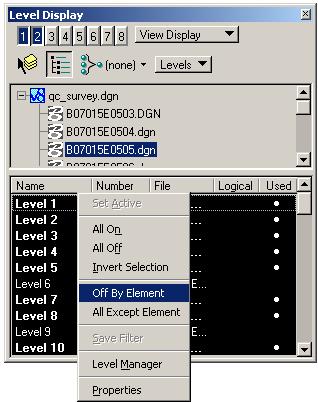
| For example, the Level Display and Reference Display
commands are nicely integrated into the Level Display form (I should
probably do a brown bag on the Level Manager/Level Display, yes?) |
 |
Windows File Open Dialog Boxes
The File Open and File Save As dialog boxes can take advantage of extended
functionality using the "Use Windows File Open Dialogs" toggle as shown below
(accessed via Workspace>Preferences).
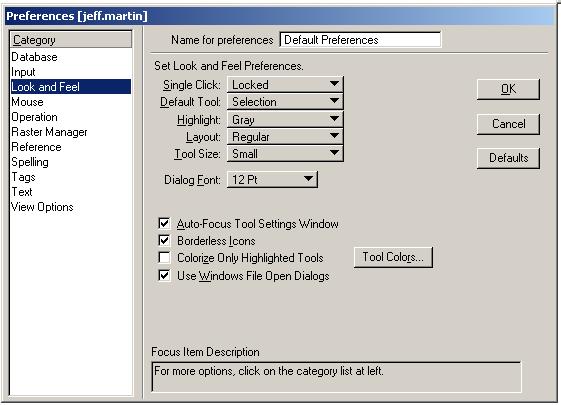
Preferences>Look and Feel>Use Windows-Style Dialogs
- allows you to cut and paste really long
path names
- has a folder history
- more
|