| Top Level: |
|
       |

| Peer Level: |
           |
|
|
Child Level:
 |
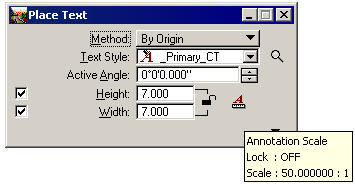
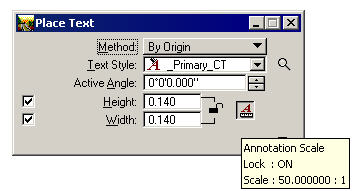
Annotation ScaleMicroStation Text Styles facilitate the management of text properties. Annotation Scale and the Annotation Scale Lock can be used to multiply a defined Text Styles size, allowing a single Style to be used for more that one plotting sheet scale. Annotation or Drawing Scale is a property of the dgn model (there can be multiple models in a dg file). CalTrans SetupFor the San Diego CalTrans-biased configuration here is the intent of using the Annotation Scale: Set up properly, InRoads and MicroStation can refer to a single set of TextStyles. The CalTrans default is for a 1"=50' drawing with most text showing up with a height of 7'. Other scales are multiples of this size. In our Configuration default InRoads is set up with a Global Text Scale factor set to 50 and MicroStation Drawing Scale is set to 1:50. Using any of the CalTrans text styles (which is set up by default in InRoads and MicroStation) should yield proper 7ft-high text.
In theory, proper text for 100-scale drawings is set up simply by setting the Global Text Scale factor set to 100 and MicroStation Drawing Scale is set to 1:100, and so on for other sheet scales. Notes on Drawing Scale and the Annotation Scale LockAnnotation Lock is a relatively new Text property. It is easily editable in MicroStation XM, but more complicated in v8. Changes have to be made from the command line. Set the Drawing Scale to the proper value and then paste in this line: CHOOSE ALL;ANNOTATIONSCALE ADD;ANNOTATIONSCALE CHANGE CURRENT;CHOOSE NONE AnnotationScale Add [Remove] is a key that toggles a text's Annotation Scale Property. AnnotationScale Change Current is used to set the text's property to the current scale.
Further Background: The following is copied from the MicroStation Help on Drawing Scale: Drawing ScaleThe Drawing Scale window is used to adjust drawing scale settings. These settings are particularly relevant to the process of creating sheet models for drawing production. To open the Drawing Scale windowThe Drawing Scale window is a dockable window that contains controls for viewing and/or modifying working units, the annotation scale factor, and the Annotation Scale Lock.
Key-in: DIALOG DRAWINGSCALE OPEN
On the Bentley SelectServices website Annotation Scale has a FAQ:
|
|