| Top Level: |
|
       |

| Peer Level: |
    |
|
|
Child Level:
 |
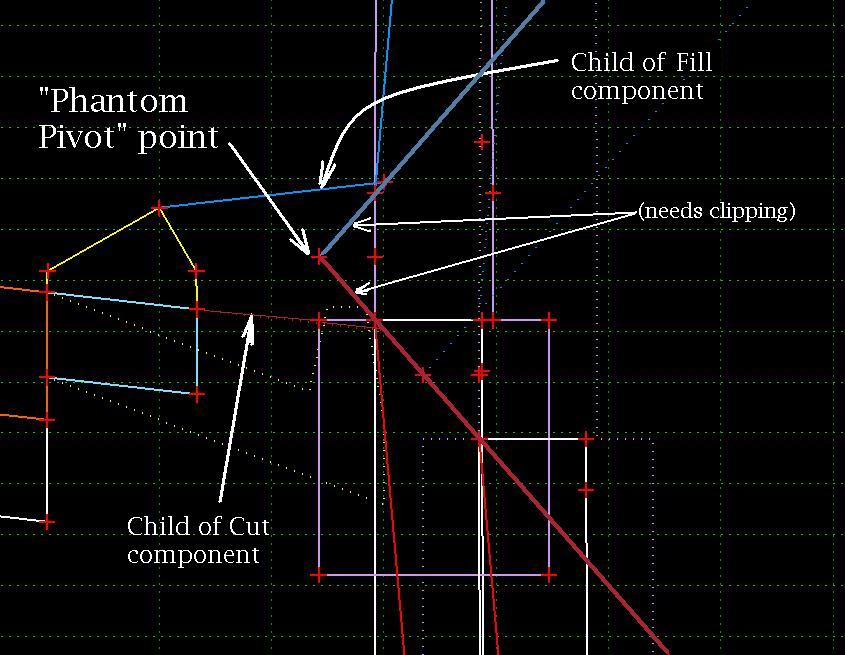
"Phantom Pivot" PointsThis is a short cut method to allowing dropping an end condition solutions (by definition it branches from a single point) on to a "complex" backbone. The example below shows how to drop the "wall_at_feature" template (which builds a cut or fill wall if it finds a "struc_Wall_horizontal" feature style). The backbone cut and fill solution branches originally branches from the Top of Dike and from the ES.
As is, the walls and daylights are correct; there's a little slop at the hinge where the Pivot Point is placed (but shouldn't be). The cut and fill slopes should not extend interior to the "child components" for cut and fill (examples of "backfilling" prior to logic branching). The child components are actually not child components: the Cut ine is displayed only if either the Cut component succeeds or the Cut Wall components succeeds using Display Rules (and with corresponding rules for the fill condition). Note: given a little time, it's best to modify the Wall end condition template so that the branching starts at the ES, but that takes some time.
|
|