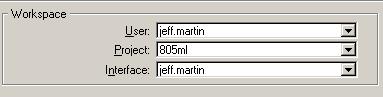
| Top Level: |
|
       |

| Peer Level: |
    |
|
|
Child Level:
 |
Turning on the MSv8 ConfigurationTo enable the MSv8 Configuration:
To disable the MSv8 ConfigurationOne example of needing to disable: using Descartes.
To select a "client" other than CalTrans v7+ D11 (Imperial) click hereUnder the hood:The first batch file copies a default set of user customizeable files to your very own (!) folder for customizations and renames the files appropriately. The second batch file copies the zkha_sd_road.cfg file to your machine's
The line
tells MicroStation where to look for our San Diego Roadway configuration Turning it OffTo turn it off delete the file from the folder or comment out the above line by putting a "#" in front of the line: # _USTN_SITE=M:/CADD/CA/SD/Road/ustn/config/site/ How It WorksFirst, MicroStation v8 for the Roadway group will be set up initially for Caltrans v8 (v7+) standards. Jeff will set up other client standards later. User Configuration
User-level configurations will no longer be used to define clients. All users will have their own User settings, rather than the shared settings like before. This means that you will be able to make changes and customize MicroStation without messing up others, and more importantly, allow others to mess up their system without messing up yours. Folders containing the appropriate files are stored in subfolders of the "users" folder with each user's Domain Name (e.g. "jeff.martin"). Button Assignments and Function Keys are examples of customizations stored in the user folders. ProjectsThe selectable project configuration files will now contain project-specific (not client-general) definitions. Really good uses for this is Reference Directories definitions and other project directory definitions. InterfaceInterfaces are customizations (to menus and toolbars) that are stored in folders within the user folders. Currently I have a <username> Interface and a "kha-road" Interface for each user. You can select either. I expect that the "kha-road" Interface will be update (clobbered) regularly. What to Do if Something's BrokenDon't worry, something is broken. At first, many things. Please let me know, jeff.martin@kimley-horn.com, I'll need your help fixing things. Links
|
|