Top Level:

Xin Updates - QC

KHA-SD Help Group Policy SD Config Client Management CAD Info & Help Projects Site Map

Peer Level: Up Xin Config Plan Sharing InRoads Updates How to Edit InRoads Commands Xini Manager Xin Updates - QC Command Owners

Child Level:
Up

Managing widely distributed "contributions"

Because XML is heavily structured, cutting-and-pasting using common tools is very flaky.  Until we get a simple-and-foolproof tool in place Jeff will do the merging and XML checks.  In theory Jeff will develop the capability in Xini Manager and then we will be able to have the content experts manage the full "vertical" of their expertise domains. 

Until then we're still working out our Preference Management processes.  Here's a first draft.  We'll improve the bad steps with better processes or maybe some tools.

Our current process is a bit fragmented:

  1. Many folks contribute to the settings cleanup and send updates to Jeff.
  2. Jeff is barely smart enough to merge the updates into the master .xin. Since he doesn't know if the input is any good, he adds the command preference into the list of preferences for a given command (rather than overwrite any of the existing preferences).
  3. Jeff sends an email out that a newly updated master.xin is available.
  4. Contributors should verify that their input was incorporated.
  5. Command Owners should review and update additions to their the Preferences for their commands.  Their may be some additions that may or may not be good or there may be some superfluous preferences that need deleting.  Figure out what needs to be done and then notify Jeff so that he can do your bidding (remember he probably doesn't know what's good and what's not).

Managing Your Command(s)

Who's in charge of which commands?  See the spreadsheet

When we get a "contribution" from some unknown source, command owners need to validate is appropriateness.

I will more than likely flag an "unverified" update (something from someone other than the command owner) with a keyword like "candidate" and who it's from.

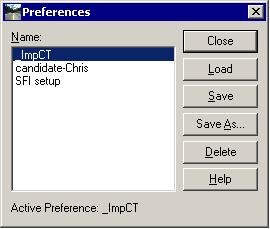
Using the Load, Save, Save As..., and Delete buttons, the command manager should be able to qualify and integrate the new updates (try to use a consistent naming convention).


Upon getting all the Preferences for your command the way you want them.  Let Jeff know.  He'll update the master .xin.

For info on using editors to edit the .xin directly see the XML_Editing page.  Note every command Preference is nested under a "Collection" for that command.


Site Map       Contact Jeff Martin with comments/concerns.        KHA San Diego Transportation Group.                    this page last edited: 2008-01-17 16:26