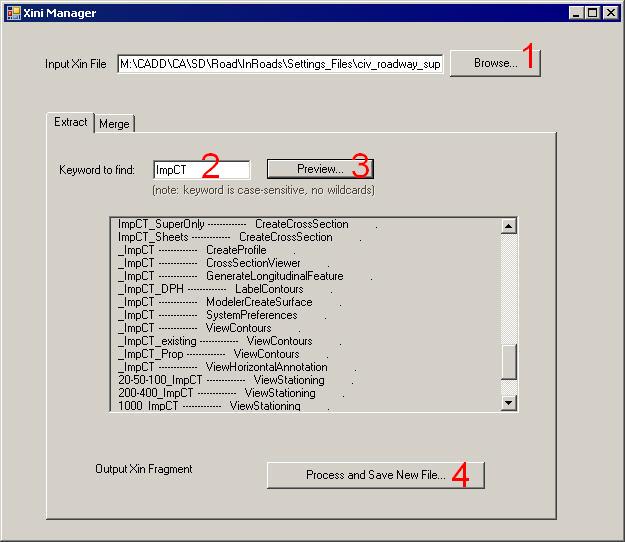
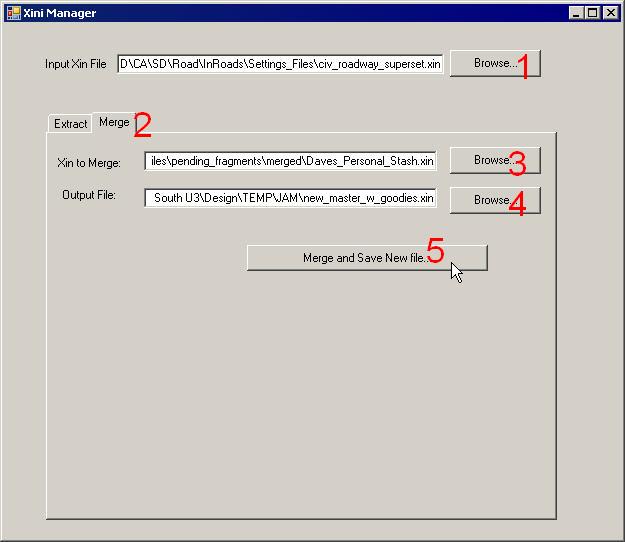
| Instructions: 1) Click the Browse button to select the source InRoads .xin
file from which to extract your keyworded Preferences (or Named
Symbologies, Feature Styles, or Filters).
2) Key in the keyword (note:
keywords should be something unused in other contexts (something unique) (you wouldn't want a
keyword of "ex" or "es", etc.).
3) A Preview box was added. Click the Preview button to see the
items "grabbed" by Xini Manager.
4) Click on the "Process" button. It will launch the windows
"File Save as..." dialog box. The result of this command is a .xin fragment (.xml file) that you can save
as your personal or project "stash" or that you can
email to the InRoads Administrator.
You can view the file by right-clicking on it (in Windows Explorer) and
selecting Internet Explorer, Notepad or any text editor. If you're extracting preferences to be shared, send the file to Jeff.
|